I Open-Sourced the AI Brain Method. The Templates Were Never the Moat.
A practical 30-minute setup for giving an AI agent lasting memory of you and your company.
The most useful thing in my 24-tool AI setup is a folder of markdown files.
Not the model. Not the latest reasoning mode. Not some secret mega-prompt.
If every new conversation starts with you explaining who you are, what the company does, what happened last week, how you like things written and which decision everyone finally made on Tuesday, you do not have a prompt problem.
You have a memory problem.
An AI brain is a small, routed set of files that gives an agent standing context, current state, history, open tasks and repeatable skills. Mine now helps run projects, prepare meetings, build software, draft content and pick up work from sessions weeks ago.
I have spent the last year building my work around AI agents. My setup is now absurdly capable.
The useful bit is a fairly boring collection of markdown files, plus a few habits for keeping them current.
So Works has open-sourced the complete AI Brain Starter Pack.
Not a teaser. Not a free template that ends halfway through and asks for your email. The personal setup, the company setup, the theory, the training material and the five working skills are all there under an MIT licence.
We did that because hiding the templates would be a fairly weak moat.
The value is not owning a blank about-me.md. The value is knowing what belongs in it, routing live information to the right home, keeping it accurate as the work changes, and building useful workflows on top. That comes from operation, judgment and repetition, not from keeping a folder structure secret.
Copy it. No email gate.
The complete method, templates, training material and five working skills are public under the MIT licence.
What is an AI brain?
Files are memory.
A conversation can feel like memory because the model has everything you just discussed sitting in front of it. Start a clean session tomorrow and that effect disappears. You are briefing a clever stranger again.
A file survives the conversation. You can read it, correct it, move it, back it up and give it to a different tool. Claude Code can read it. Codex can read it. Gemini CLI can read it. Whatever comes next can probably read it too.
That portability matters. The model and interface are rented. They will change constantly. Your context, your working rules and your accumulated knowledge should belong to you.
Can Claude and Codex share the same AI brain?
Yes. They need different entry files, not different brains.
Claude Code reads CLAUDE.md. Codex reads AGENTS.md. Both files should route to the same context, memory, tasks, history and skills inside one folder you control.
AI Brain/
  CLAUDE.md
  AGENTS.md -> CLAUDE.md
  about-me.md
  working-preferences.md
  current-context.md
  TASKS.md
  debrief-history.log
  memory/
  skills/
Where the filesystem supports it, use a relative symlink from AGENTS.md to the canonical CLAUDE.md. Otherwise, generate an identical copy and run a drift check. Do not maintain two hand-edited instruction files and hope they stay aligned.
Hidden tool memory can cache this context or point at it, but it should never be the only copy. The owned folder is the source of truth. That is what lets a correction made through one runtime survive when you switch to another.
The pack includes a visual shared-brain walkthrough and the exact setup for one brain across Claude and Codex.
Every working brain has four jobs: Capture, File, Maintain and Ask. Each kind of information needs one home, a rhythm that keeps it current, and a clear route that lets the agent read only what the job requires. Dumping every document into a folder gives you a bigger haystack and a faster horse searching through it.
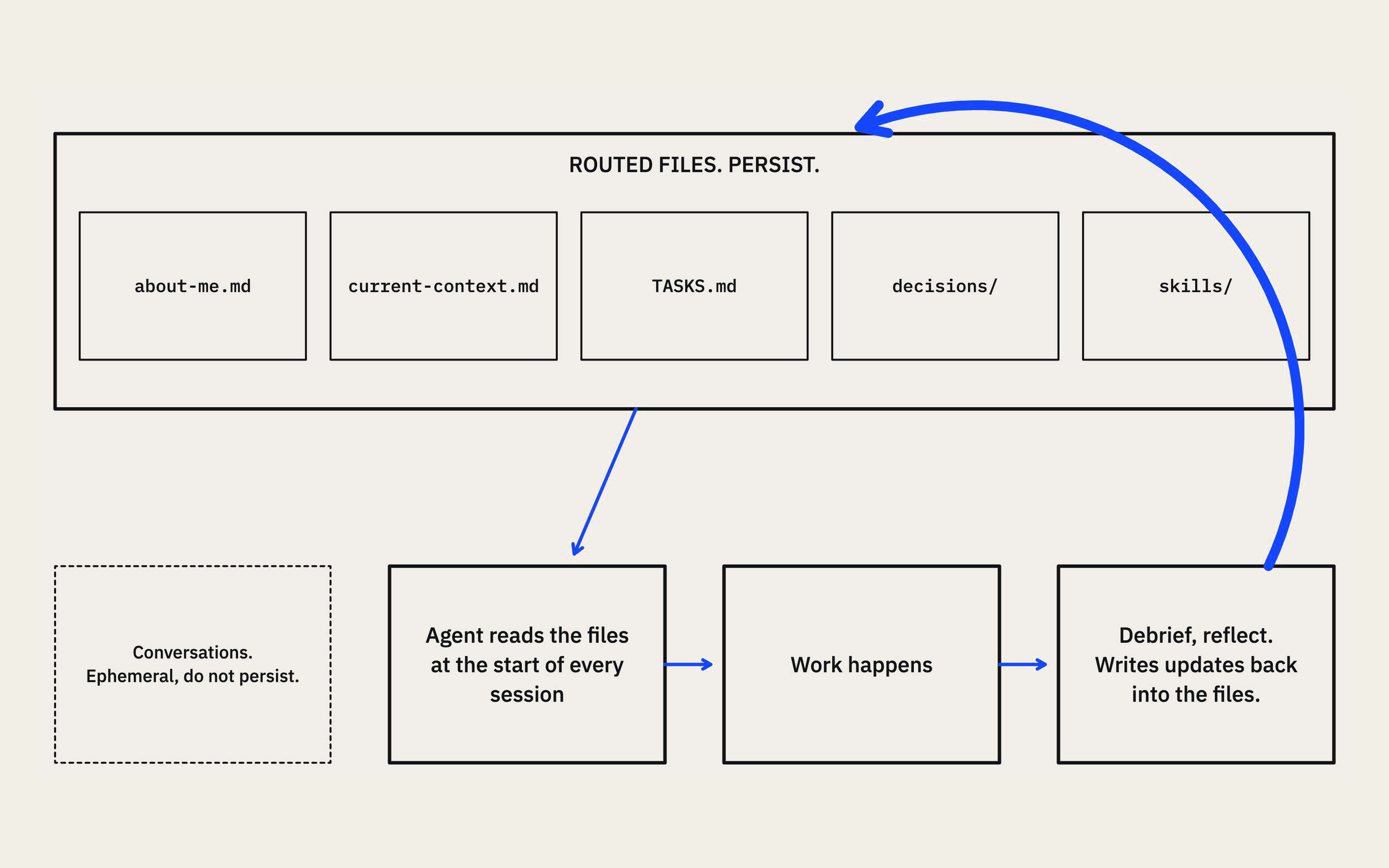
The complete method inside the starter pack
What files does an AI brain need?
The personal version starts with three homes:
- Current state lives in the relevant context file and gets updated in place.
- History is appended to
debrief-history.log. - Open tasks live in
TASKS.md, with completed work removed.
That separation sounds trivial. It fixes an enormous amount of agent confusion.
Without it, current-state files slowly become dated journals. Task lists fill with completed work. Decisions get copied into three places and eventually disagree with one another. The AI then finds several plausible versions of the truth and confidently chooses the wrong one. Great fun.
One type of information, one authoritative home.
You also create an about-me.md with the context that should remain true across jobs: who you are, how you work, the kind of work you do, your preferences and your boundaries. Keep it short and honest. You are giving the agent useful standing context, not writing your authorised biography.
The first deployed version can be this small:
your-folder/
  about-me.md
  TASKS.md
  debrief-history.log
  one-area/
    CLAUDE.md
  skills/
    debrief/
    reflect/
    morning-sweep/
    weekly-update/
    meeting-notes/
How do you keep an AI brain current?
Files go stale unless real work changes them. The pack uses two small loops to keep the brain alive.
Debrief asks what happened. What did we decide? What is now true? What remains open? What are we waiting on?
It then proposes the right writes: the session story to history, changed status to the current-state file, and open actions to the task list. You review the plan before it touches anything.
Reflect asks a different set of questions. What did the agent misunderstand? What correction did I make? Which preference should apply next time? Where did the workflow create friction?
That turns a one-off correction into a durable improvement. If I tell an agent three times that I never use em dashes, I have failed to build memory. The correction belongs in the voice file once, then every future writing task should inherit it.
Debrief keeps the work accurate. Reflect makes the way you work improve.
You need both. A system that only debriefs remembers every decision while repeating the same annoying mistakes. A system that only reflects gets better manners while forgetting what the business decided.
How do you set up an AI brain in 30 minutes?
Do this with one real piece of work. Do not spend the first weekend designing the perfect second brain. That rabbit hole has very good lighting and no exit.
Minutes 0 to 2: make a private working folder
Copy the you/ package and the shared skills/ folder into a fresh private folder or private repository. Do not work inside the public starter pack itself.
Minutes 2 to 10: create standing context
Use the included prompt to draft about-me.md. Answer only what you know, review the file and cut anything that sounds invented or grandiose.
Minutes 10 to 17: create the three homes
Set up one current-state context file for the area you are working in, debrief-history.log for dated history, and TASKS.md for open work. Tell the agent exactly what belongs in each. Current state is overwritten. History is appended. Tasks stay current.
Minutes 17 to 20: check the skills
Confirm the five skill folders are present. Start with debrief and reflect. Leave the morning sweep, weekly update and meeting notes until the basic loop works.
Ask the agent to read those two skills and confirm it can use them in personal mode. Tell it not to write yet.
Minutes 20 to 28: run one real debrief
Give it notes from a real meeting or a piece of work you just finished. Ask it to run debrief.
The agent should show every proposed file change before writing. Check that history, current state and tasks are going to their proper homes. Approve only the correct changes.
Minutes 28 to 30: reflect on the setup
Ask the agent to reflect on the session. Pick one correction or preference worth keeping and approve that write.
You are done when the next clean session can describe who you are, find the current work, identify the open tasks and understand what happened last time without another biography from you.
That is the 30-minute test. It is not a promise that your entire working life will be documented before the kettle boils. It is a design constraint: the first useful loop should work within half an hour. If it does not, remove structure until it does.
When should you build a company brain?
The temptation is to jump straight to a giant company brain. Resist it.
Start with yourself because you can judge the output quickly. You know whether the context is true. You can see when a debrief routes something badly. You can build the habit without asking a team to trust an unproven filing system.
Once that personal loop works, the same pattern can expand into a company brain: refined company facts, useful context about people, a shared operating layer, recorded decisions, waiting items, meeting notes and a weekly rhythm.
The company setup starts with at least 10 copied source documents. Strategy notes, product documents, customer research, role descriptions and recent reports are evidence. Blank questionnaires are not. The agent inventories the evidence, refines the useful facts, flags uncertainty and proposes the brain files. A person reviews every claim before it becomes trusted context.
The path is simple: Evidence, then Refine, then Review, then Approved brain. Skills sit on top of that approved context.
That order is what stops a clever workflow from becoming a very fast way to produce generic rubbish.
If you want the theory behind the company version, read The Company Brain: The AI Layer That Knows Your Business.
How do you keep an AI brain private?
The starter pack is public. Your filled-in copy should not be.
Once it contains names, deals, commercial numbers, candid people context and business history, it is a confidential company record that happens to be written in markdown.
- Copy the pack into a private repository or private folder. Do not fork it on GitHub. Forks of public repositories are public.
- Never put credentials in the brain. API keys, passwords and tokens belong in a secrets manager or a local
.envfile. The brain stores facts the agent may read, never keys it could leak. - Read any file as an outsider before sharing it. People files and current-state files are useful precisely because they can be candid. That also makes them sensitive.
Use copies of important source documents while setting up. The brain should wrap around your existing work, never overwrite or replace it. Keep the human approval gate: the AI drafts, you send. Run a workflow manually twice before you automate it.
Why did Works open-source the AI Brain Starter Pack?
Because templates are not the scarce part anymore.
The hard part is turning messy company reality into trustworthy context, deciding which facts deserve to persist, maintaining the system as work changes, and building skills that respect the actual approval boundaries of the business.
You cannot download judgment. But you can stop wasting time recreating the basic structure.
Take the pack. Copy it. Break it. Make it fit the way you work. Just start small enough that you can tell whether it is helping.
One useful context file. Three homes. One real debrief. One correction that never needs to be made again.
That is enough to give your AI something much more valuable than a clever prompt.
It gives it a memory you own.
Build the first useful version in 30 minutes.
Copy the complete open-source pack, then start with the personal quickstart.
Want the shared brain installed properly?
Works embeds an operator who mines the source material, installs the brain, sets the approval rules, trains the team and builds the first production workflows on top.
Book a call →